
IN THIS ARTICLE
Generic Assets
The Generic Asset system in O3DE allows you to use a C++ class derived from AssetData as an asset.
This is a brief guide on how to make a Generic Asset based on your C++ Data class.
Generic Assets are ideal for the kind of data that is just a serialized C++ class, with data you would edit in a property grid. The default editor for Generic Assets is the O3DE Asset Editor:
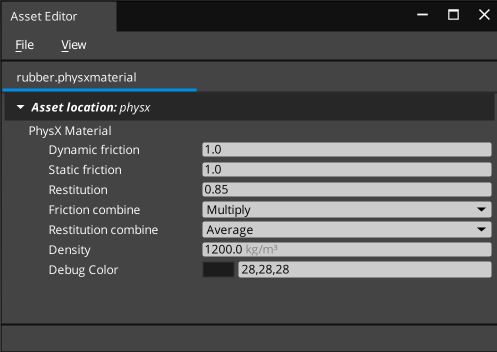
The Generic Asset system has premade classes to handle the registration and building of your new asset type. The only parts you need to provide are:
- An
AssetData-derived c++ Class which is declared to serialize and edit reflection. This is your actual asset, holding whatever data you want for access during runtime. This class must have the appropriate reflection tags on it. - An instance of
GernericAsset<T>where<T>is the type of yourAssetData-derived class, ie,GenericAsset<MyFooAsset> - A System Component, active in both build and tools contexts that can register your Generic Asset Handler before the Generic Asset Builder queries all the registered handlers.
The AssetData class
This class is the actual “Asset”. It contains the data you want to make available at runtime, and what it contains is entirely up to you. Since this document is about the Generic Asset system, the assumption is that this class is a data holder for whatever c++ serializable properties you want.
// An example of an Asset class
class MyAsset : public AZ::Data::AssetData
{
public:
    // Create a **Unique** UUID.  This is the actual "Asset Type" that other systems will refer to.
    // We indicate to the RTTI system that it is derived from AZ::Data::AssetData
    AZ_RTTI(MyAsset, "{BA712E9A-D18F-4404-B709-7A08E29B0B1C}", AZ::Data::AssetData);

    // Allocate memory for this asset using the System Allocator.
    AZ_CLASS_ALLOCATOR(MyAsset, AZ::SystemAllocator);

    MyAsset() = default;
    virtual ~MyAsset() = default;

    // Reflect's job is to describe this type to the reflection/serialization system.
    // It is not automatically called by the system, because this is not an AZ::Component.
    // Your system component is responsible for calling this.
    static void Reflect(AZ::ReflectContext* context);

    // --------------------------------------------------------------------------------
    // The rest of this class is whatever data you want to store in your asset, however
    // you might want to store it, including containers, AZStd::Any, plain data fields, refererences
    // to other assets, etc.  It can include anything that can be serialized using the O3DE
    // serialization system, including pointers, pointers to a base class, containers, etc, just like any
    // component class.

    // Here are some examples:
    int m_myIntegerField = 5;  // store an integer.

    AZStd::vector<AZStd::string> m_strings; // store a vector of strings.

    SomeStruct m_someOtherStruct; // a member variable storing some other class.  Note that the other
                                  // class must also be declared to serialize/reflect for this to work.

    // You can also refer to *other* asset types if your asset requires them and specify that they
    // are PreLoad, QueueLoad, or NoLoad dependencies.
    AZ::Data::Asset<AZ::RHI::MaterialAsset> m_materialToUse { AZ::Data::AssetLoadBehavior::PreLoad };

    // It is also possible to refer to an asset by AssetId.  These will always assumed NoLoad.
    AZ::Data::AssetId m_referencedAssetId;
}
The Reflect function for an AssetData is how you tell the system how to read/write it and how to
display it in the Asset Editor UI. It works exactly the same as
Component Reflection does, declaring each field to the system, so if you want to understand more about how you can customize the Editor UI for your class, see that guide.
void MyAsset::Reflect(AZ::ReflectContext* context)
{
    auto serialize = azrtti_cast<AZ::SerializeContext*>(context);
    if (serialize)
    {
        // describe your Asset Data to the serialize system:
        serialize->Class<MyAsset, AZ::Data::AssetData>() // My class is MyAsset and I am derived from AssetData
            ->Version(1)
            ->Attribute(AZ::Edit::Attributes::EnableForAssetEditor, true)  // use the Asset Editor to edit this asset.
            ->Field("m_myIntegerField", &MyAsset::m_myIntegerField)
            ->Field("m_strings", &MyAsset::m_strings)
            ->Field("m_someOtherStruct", &MyAsset::m_someOtherStruct)
            ->Field("m_materialToUse", &MyAsset::m_materialToUse)
            ->Field("m_referencedAssetId", &MyAsset::m_referencedAssetId);

        if (auto edit = serialize->GetEditContext())  // the serialize context will have an "edit" context as a child in the editor.
        {
            // here you describe the UI you want to see in the Asset Editor window for your class.
            // This is the same process for reflecting an AZ::Component.  Each DataElement represents one row in the property editor,
            // and consists of:
            // preferred editor (or 0 for default) - this is for example choosing to use a slider vs a spinbox for an integer
            // The field itself
            // The display text to show in the property editor row
            // The tooltip for extra information
            // Each field can also have attributes further describing the editor behavior, such as OnChange callbacks, etc.
            edit->Class<MyAsset>("Friendly Name For My Asset", "Additional Help Text for My Asset")
              ->DataElement(0, &MyAsset::m_myIntegerField, "My Integer", "Tooltip for My Integer")
              ->DataElement(0, &MyAsset::m_strings, "Strings", "These are strings")
              ->DataElement(0, &MyAsset::m_someOtherStruct, "SubStruct", "Sub structure")
              ->DataElement(0, &MyAsset::m_materialToUse, "Material", "Which material to use")
              ->DataElement(0, &MyAsset::m_referencedAssetId, "AssetIdRef", "Some other Asset of some kind")
                ->Attribute(AZ_CRC_CE("SupportedAssetTypes"), []() {
                        AZStd::vector<AZ::Data::AssetType> supportedAssetTypes;
                        supportedAssetTypes.push_back(AZ::Data::AssetType(AZ::RHI::ModelAsset));
                        return supportedAssetTypes;
                    });

        }
}
Things to take notice of the above reflection:
->Attribute(AZ::Edit::Attributes::EnableForAssetEditor, true) // use the Asset Editor to edit this asset.Without this, you will have to provide a custom asset editor of your own (ie, a custom gui). This is also useful if you don’t want the Generic Asset Editor GUI to be responsible for editing your asset and have some other plans in mind. If this is set to true, the asset type will automatically show up in the Asset Editor “Create New…” menu, and automatically show up in the Asset Editor if you double click the asset in the asset browser.->Attribute(AZ_CRC_CE("SupportedAssetTypes"), []() { ...}is necessary on theAssetIdvariable, but not theAsset<AZ::RHI::Material>asset variable. This is because anAsset<T>explicitly includes the type of asset suitable for it (theTinAsset<T>) but an AssetId does not.
The System Component responsible for registering the asset class
Once you have this, you need A System Component to register this asset type, as well as a Generic Asset Handler for it. If you are writing a gem, you probably already have a system component for your gem, so you can just add this functionality to the existing system component’s Reflect, Activate, and Deactivate functions. Otherwise, you can create one like this:
    //! MyAssetSystemComponent is created on startup of the engine, and destroyed on shutdown.
    //! It's job is to make sure the MyAsset type is registered appropriately.
    class MyAssetSystemComponent : public AZ::Component
    {
    public:
        // As always, invent a new UUID for this one, and it must be unique.
        AZ_COMPONENT(MyAssetSystemComponent, "{4BE8242D-BA7C-490D-BF37-1ECC65CD9321}");

        MyAssetSystemComponent() = default;
        ~MyAssetSystemComponent() override = default;

        void Init() override {};

        // Called on system startup, your oppotunity to register things
        void Activate() override;

        // Called on shutdown, your opporunity to clean up.
        void Deactivate() override;

        // Reflect is automatically called by the system, on startup (Before even Activate and Deactivate)
        // and is your chance to describe types to the system, specifically the MyAssetSystemComponent type
        // as well as non-component types it is responsible for such as MyAsset.
        static void Reflect(AZ::ReflectContext* context);

        // The following control the sort order of components during startup.
        static void GetProvidedServices(AZ::ComponentDescriptor::DependencyArrayType& provided);
        static void GetIncompatibleServices(AZ::ComponentDescriptor::DependencyArrayType&) {}
        static void GetRequiredServices(AZ::ComponentDescriptor::DependencyArrayType&) {}
        static void GetDependentServices(AZ::ComponentDescriptor::DependencyArrayType&) {}

    private:
        // This is the actual asset handler which does all the registration:
        using MyAssetHandlerType = AzFramework::GenericAssetHandler<MyAsset>;
        AZStd::unique_ptr<MyAssetHandlerType> m_myAssetHandler;
};
The implemented functions which truly matter are:
// Provide the AzFramework::s_GenericAssetRegistrar service.
// This causes MyAssetSystemComponent to Activate() BEFORE the Generic Asset Builder system component since
// that system component declares GetDependentServices on the same thing.  Because my Component will thus
// be active before the Generic Asset Builder system component, my registration will already be complete
// before the system component queries all registrations.
void MyAssetSystemComponent::GetProvidedServices(AZ::ComponentDescriptor::DependencyArrayType& provided)
{
    provided.push_back(AzFramework::s_GenericAssetRegistrar);
}

void MyAssetSystemComponent::Reflect(AZ::ReflectContext* context)
{
    // IMPORTANT:  Make sure to actually reflect your Asset Type to the reflection system.
    // Only AZ::Component-derived classes are automatically reflected.  They are responsible for reflecting everything else.
    MyAsset::Reflect(context);

    if (AZ::SerializeContext* serialize = azrtti_cast<AZ::SerializeContext*>(context))
    {
        serialize->Class<MyAssetSystemComponent, AZ::Component>()
            ->Version(0)
            ->Attribute(AZ::Edit::Attributes::SystemComponentTags, AZStd::vector<AZ::Crc32>({ AssetBuilderSDK::ComponentTags::AssetBuilder }));
    }
}

void MyAssetSystemComponent::Activate()
{
    // Create and register the asset handler:
    m_myAssetHandler = AZStd::make_unique<MyAssetHandlerType>(
                        "My Asset", // friendly name that will show up in the asst browser and "Create New..." UIs
                        "My Group", // in UIs that group assets or filter assets by type (Graphics, Scripting, ...) choose a group it belongs in.
                        "myasset"); // file extension to register, choose something unique.  this will create "blah.myasset" files on disk.
    m_myAssetHandler->SetAutoBuildAssetToCache(true); // optional, but recommneded to start with
    m_myAssetHandler->Register();
}

void MyAssetSystemComponent::Deactivate()
{
    myAssetHandler->Unregister();
    myAssethandler.reset();
}
Important pieces to take especial note of above:
->Attribute(AZ::Edit::Attributes::SystemComponentTags, AZStd::vector<AZ::Crc32>({ AssetBuilderSDK::ComponentTags::AssetBuilder }));
The System Component will not be active during asset building time (inside Asset Processor) without this tag. We need it to be active there, since this is what builds your assets.
m_myAssetHandler->SetAutoBuildAssetToCache(true); // optional, but recommneded to start with
This is what tells the system that it should handle building your asset, extracting dependencies, making it show up in the cache, telling Asset Processor about it, etc, for you. If you don’t set this to true, you will need to make a custom Asset Builder for it, using a copy builder, or a python asset builder, or some other custom builder that is responsible from getting it from source data into the compiled data in the cache.
You can change your mind later and add one when you feel the need to custom compile these assets, or you can start that way.
As always, your System Component should be registered with the Module it lives in, see Creating A Component for more information. The system component should also be set to be active by default, see Making a component a system component for more information.
Making sure the module that contains your system component actually loads in the Asset Builder and Editor
The CMake Script files CMakelists.txt in your gem controls what actual modules (DLL/SO files) load. Your gem can have
many different modules, not all of which are to be loaded in every circumstance - for example, you might have a module that contains
all your gameplay code. That code does not need to be loaded and active while building assets, but does need to be loaded and
active when running the game standalone, or in the editor. Conversely, you might have a module which is full of tools code, things
like rendering gizmos, handling mouse drags, previews, none of which should be present in the final shipping game runtime. That
module should be loaded by the Editor and other tools, but not the runtime.
Your system component probably already loads in the editor and runtime, but for automatic asset building to the cache to work, the component must also be loaded by asset builders.
See
Gem Loading for more details, but in brief, this involves finding where
your targets are declared in your Gem’s CMakeLists.txt file. In that section, they will already have a declaration of what situations
they are to be loaded via ly_create_alias calls:
# this declares that there exists a target called Gem::MyGemName.   It is
# a loadable gem module.  It is probably already present in your Gem's CMakeLists.txt file.
ly_add_target(
        NAME MyGemName ${PAL_TRAIT_MONOLITHIC_DRIVEN_MODULE_TYPE}
        NAMESPACE Gem
        ... other attributes ..
    )

# This section tells O3DE when to load the above target (By its Name):

ly_create_alias(NAME MyGemName.Clients NAMESPACE Gem TARGETS Gem::MyGemName) # load it in Clients
ly_create_alias(NAME MyGemName.Servers NAMESPACE Gem TARGETS Gem::MyGemName) # load it in Servers
To make sure that the above module (Gem::MyGemName) also loads inside Asset Builders, we make another alias:
# this tells O3DE to load the module (DLL or SO file) from a target called `Gem::MyGemName` into the Asset Builder.
ly_create_alias(NAME MyGemName.Builders   NAMESPACE Gem TARGETS Gem::MyGemName) # load it in builders.
With all of the above, your custom asset types will appear in the “Create New” menu in the Asset Editor.
Any time you create one using this editor, it will be processed into binary by the Asset Processor, and will be
available via drag-and-drop or browse in the Asset Browser UI, to use in custom components with a member
field of type AZ::Data::Asset<T>, where the <T> is your Asset class, derived from AZ::Data::AssetData.