
Data Asset
A custom data asset class, complete with a dedicated system component that registers its asset handler at startup. Use this template when you need a new custom asset type, rather than a component that attaches to entities. A designer-authored data file with its own extension is one example. This template is also known as Generic Asset, after the GenericAssetHandler it registers.
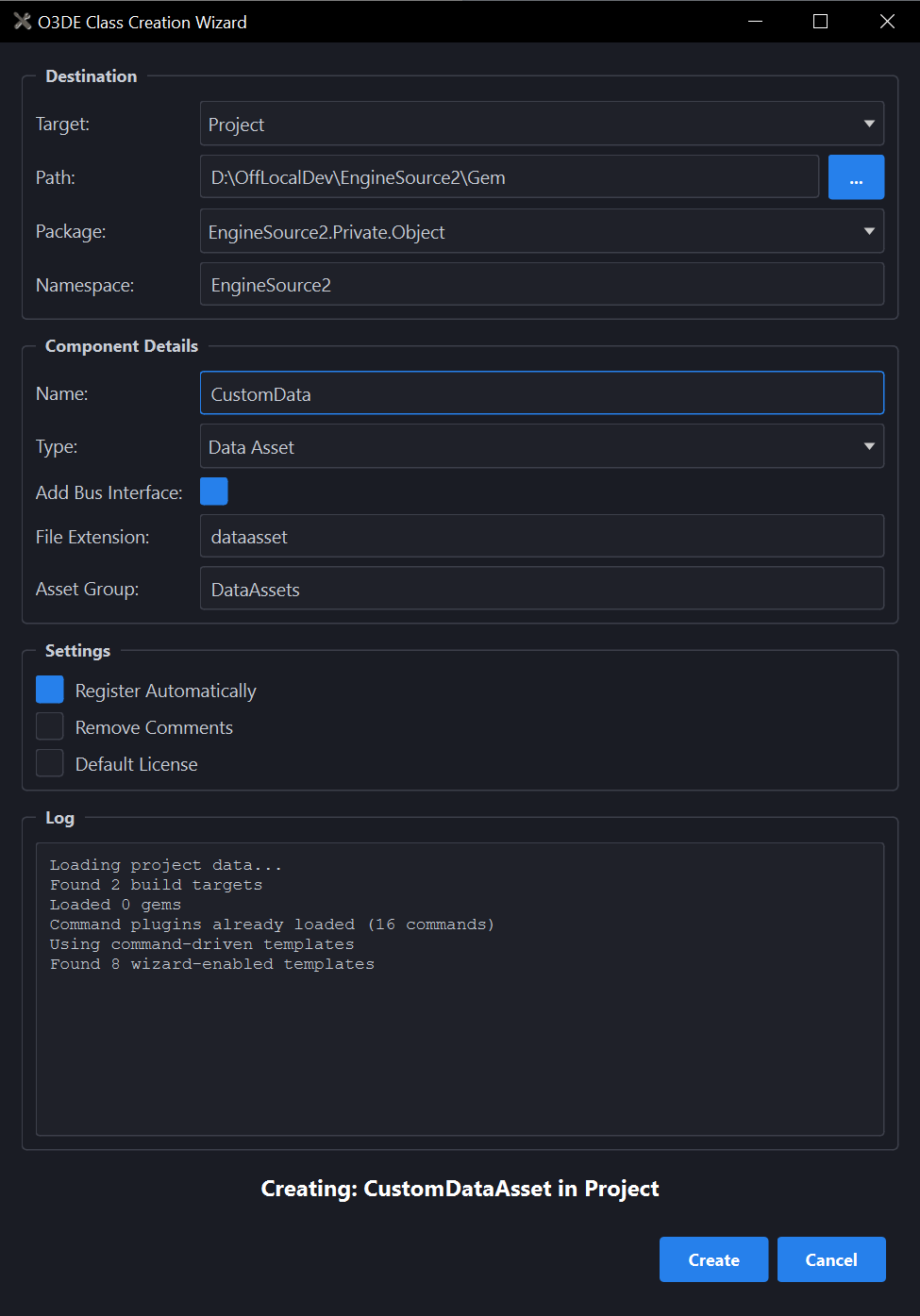
What you’ll fill in:
| Field | What it does |
|---|---|
| Add Bus Interface | On by default. Generates a companion EBus interface header for this asset type. |
| File Extension | Required. The file extension the Asset Processor will recognize for this asset type (e.g. dataasset), without the dot. |
| Asset Group | The category this asset type appears under in the Asset Browser (e.g. DataAssets). Any name works. It’s not limited to a fixed list. |
Fill in a Component Name. Leave Add Bus Interface on unless other components never need to call this asset type. Set File Extension to the extension this asset type should use. Set Asset Group to the Asset Browser category it should appear under, or leave the default. Pick the Gem you’re adding it to, then select Create. This asset type then appears in the Asset Editor’s File > New menu.
For the full generated file list, process commands, and template.json schema, see
Data Asset in the Developer Guide.