
IN THIS ARTICLE
Emitter ‘Event’ Module
The Event module allows an emitter inside a particle effect to emit, or listen for, events published when certain things happen such as particle death. This can be used to make more particles emit as a result of those events.
Generally, this is best used by using multiple emitters within the same particle system, and having one of them publish events, and have the other listen for those events and perform actions like spawning particles when they occur.
The module also allows the events to carry information about the particle emitting the event, for example, its velocity or position, which can be used by the event handler to inherit those properties into the created particles.
You can see an example of this in action if you open the example particle inheritance.particle in the Particle Editor.
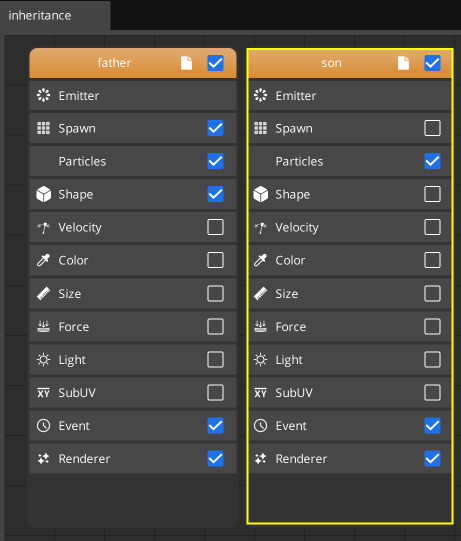
Note how the “Father” particle has a spawn module, which automatically creates the particles. However the son
module does not, and relies on Event instead.
Note:This event system only works within the same particle system, it is not a global event.
Emitting Events
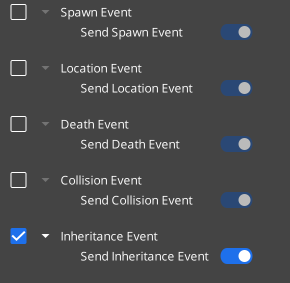
The “sender” of the event must toggle one of the event options to ON, like so:
Receiving Events
The “receiver” of the event must add an event handler, to respond to the event, by clicking Add Event Handler, which will show a UI like so:
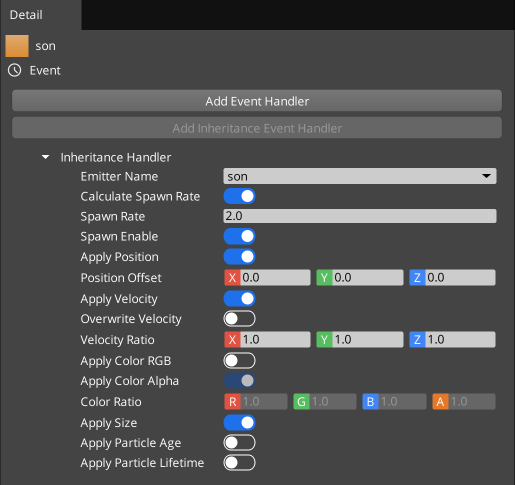
Note:Note that Inheritance events are different from regular events, and have their own dedicated button to add a handler, theAdd Inheritance Event Handlerbutton.
Emitted Event Types
The following events are emitted if the associated “Send xxxxx Event” toggle is switched to the ON position:
- Spawn Event
- Whenever a particle spawns, it emits the spawn location into an
UPDATE_SPAWNevent.
- Whenever a particle spawns, it emits the spawn location into an
- Location Event
- Every frame, every particle emits an
UPDATE_LOCATIONevent. Potentially expensive with lots of particles.
- Every frame, every particle emits an
- Death Event
- Each time a particle runs out of remaining lifetime and is removed, it emits an
UPDATE_DEATHevent containing the position of death.
- Each time a particle runs out of remaining lifetime and is removed, it emits an
- Collision Event
- Sent by the
Forcemodule, when a particle collides with a given plane. Contains the position of the particle at the moment of the collision
- Sent by the
- Inheritence Event
- Every particle currently existing saves its current state every frame into a buffer. This buffer is used by the inheritance handler to set properties of the particles being emitted. (See below section)
Handled Event Types (Regular)
The following event types can be listened to by clicking “Add Event Handler”. When you do this, the properties appear:
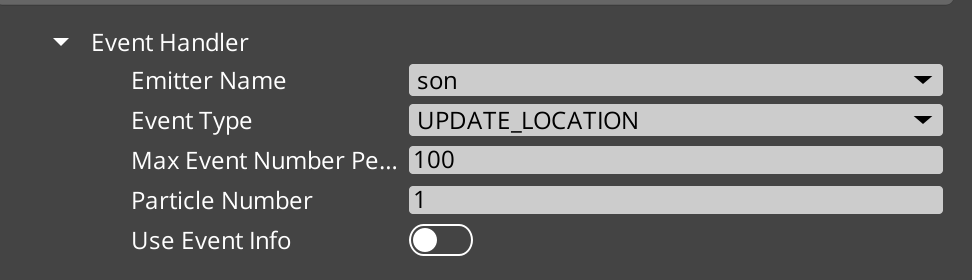
Whenever an event is triggered, the handler will behave as if a particle spawn was requested by the Spawn module even if the spawn module is disabled.
- Emitter Name - the name of the emitter that will emit the event. This is “who to listen to”.
- Event Type - the type of event to listen for.
- Each of these types is matched up with an emitted event type from the section above.
- Max Event Number Per Frame - puts a cap on how many times this will trigger a spawn per frame. This must be non-zero to function at all.
- Particle Number - How many particles to emit - this is similar to the Burst option in the spawn module. Setting this to 100 will cause 100 particles to be emitted for each event received.
- Use Event Info - Each event (Spawn, Location, Collision, and Death) comes with the position of the particle emitting the event as its payload. If you set this option to
ON, then the position of the spawned particle will be overwritten by this event payload, causing the spawned particle to start at the location of the event occurring instead of at it’s normal emission point.
Handled Event Types (Inheritance)
The inheritance handler is special as it allows particles to inherit other properties from the emitting event, not just position. It causes the listening particle emitter to trigger its spawn
- Emitter Name - the name of the emitter that will emit the event. This is “who to listen to”.
- Calculate Spawn Rate
- If this is set to
ONit will cause the child effect to re-emit particles at the constant rate given in theSpawn RateProperty. This is equivalent to creating a new instance of the child effect associated with each spawned particle in the event emitter and having it spawn at this rate until the parent particle is destroyed. - If this is set to
OFFthen it will trigger the child effect to emit, just once, each time a new particle is spawned by the parent.
- If this is set to
- Spawn Rate - If Calculate Spawn Rate is set to
ON, this specifies how many spawns of the child must occur each second. - Spawn Enable - This allows you to toggle the spawning off. If this is
OFF, then no spawning will occur andSpawn Rateas well asCalculate Spawn Ratewill have no effect. It can be handy for temporarily toggling the effect off in the editor to see the parent particles if they are obscured by the child particles.
The remainder of the options allow you to choose which attributes from the parent to copy into the child.
- Apply Position - If
ON, the spawn will occur at the location the parent is currently at instead of the location specified by the child’sShapemodule. - Position Offset - Allows adding an offset to the position spawned. Only effective if Apply Position is
ON. - Apply Velocity - If
ON, the spawn will combine the velocity of the parent and the child’s velocity, depending on the value of Overwrite Velocity and Velocity Ratio below. - Overwrite Velocity - If set to
ON, the velocity of the child will ignore the velocity set in its Start Velocity setting in the Particle module. If set toOFF, that setting will be applied in addition to the parent’s velocity. - Velocity Ratio - If Apply Velocity is
ON, then this multiplies the incoming parent velocity by this vector, component-wise, before adding it to the child being spawned. For example, to inherit half of the parent’s velocity, this could be set to (0.5, 0.5, 0.5). - Apply Color RGB - If
ON, this overwrites the child emitted particles initial RGB values with the parent’s color values at the moment of emission. - Apply Color Alpha -
IfON`, this overwrites the child emitted particles alpha value (transparency) with the parent’s alpha value at the moment of emission. - Color Ratio - The parent’s color is multiplied by this value component-wise, before being blended into the child’s color values, if
Apply ColorisON. Because this is multiplicative, setting this to (0,0,0) would make it black. - Apply Size - If
ON, Copies the current size of the parent particle into the child particle on emission. - Apply Particle Lifetime - If
ON, copies the remaining lifetime of the parent particle into the child particle when it is spawned.